Every gamer hits that point where their old mouse starts double-clicking on its own, or the sensor just feels “off” mid-match. That’s usually the moment you go down the rabbit hole of searching for something better and then you see gaming mice priced at $120, $150, even $180, and think, “do I really need to spend that much just to click a mouse button faster?”
Short answer: no, you don’t. Over the last few months I’ve swapped through half a dozen budget mice, used them across different genres shooters, MOBAs, the occasional late-night grind session and picked out the ones that genuinely earn their spot on a desk without draining your wallet. None of these cost more than $30 (give or take a dollar or two depending on sales), and all of them punch well above what that price tag suggests.
Here’s the full breakdown, mouse by mouse.
1. Logitech G203 (The One Everyone Recommends (For Good Reason)
If you ask around gaming forums for a cheap mouse recommendation, this name comes up constantly, and honestly, it deserves the hype. The G203 uses Logitech’s in-house optical sensor capable of tracking up to 8,000 DPI, and in real gameplay, that translates to smooth, predictable cursor movement without any weird jumps or delays.
What surprised me most was how solid it felt for the price. The shell doesn’t creak, the buttons have a satisfying click, and the shape works for both palm and claw grip styles which is rare at this price point. It also comes with customizable RGB lighting that you can sync to match your setup, plus Logitech’s software lets you save DPI profiles so you’re not stuck cycling through presets mid-match.
The only real weak point is the cable it’s a bit stiffer than I’d like, but a simple cable clip or zip tie fixes that in about ten seconds.
Best for: Anyone who wants a no-nonsense, reliable mouse without learning a new software ecosystem.
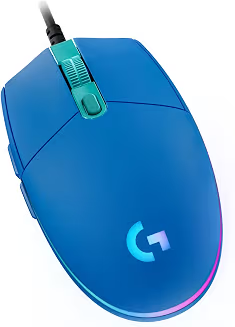
Logitech G203 Wired Gaming Mouse – Blue
LIGHTSYNC RGB, On-Board Memory, 6 Programmable Buttons, Compabile with PC/Mac
| Brand | Logitech G |
| Color | Blue |
| Connectivity Technology | USB |
| Special Feature | Lightsync RGB Lighting |
| Movement Detection Technology | Optical |
2. SteelSeries Rival 3 (Built for Long Sessions)
This one’s a personal favorite for anyone who games for hours at a stretch. The Rival 3 uses SteelSeries’ TrueMove Core sensor, and while the spec sheet numbers (8,500 CPI, 1-to-1 tracking) sound like marketing fluff, they actually mean something in practice the cursor tracks exactly where your hand moves, no drift, no random acceleration.
Comfort-wise, this mouse has a gentle curve that cradles your palm nicely, so even after three or four hours of gameplay, your hand doesn’t feel cramped. It’s rated for 60 million clicks on the switches, which is more than most people will ever need in the mouse’s lifetime. The three-zone RGB lighting is a nice touch too, though it’s subtle enough not to be distracting during intense moments.
One small annoyance: the side buttons feel a touch stiff out of the box. Nothing that ruins the experience, but worth knowing.
Best for: Marathon gaming sessions and anyone who prioritizes comfort over flashy extras.
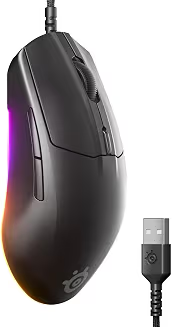
SteelSeries Rival 3 Gen 2 Gaming Mouse
| Brand | SteelSeries |
| Style | Rival 3 Gen 2 – Wired |
| Color | Black |
| Connectivity Technology | USB |
| Special Feature | Gaming |
3. Razer DeathAdder Essential (The Esports Staple)
The DeathAdder name carries weight in competitive gaming circles, and the Essential version brings that reputation down to an affordable price. It runs a 6,400 DPI optical sensor, which is more than enough precision for fast-paced shooters like Valorant or CS2.
What stood out to me during testing was the grip. The textured rubber panels on both sides genuinely help when your hands get sweaty during a tense round — something a lot of budget mice completely ignore. The shape is ergonomic and right-handed specific, so if you’re left-handed, this one’s not for you, but for right-handed players, it fits like it was molded for your hand.
The trade-off here is software there isn’t much of it. You adjust DPI by cycling through preset levels using a button on top rather than through an app. For some, that’s a non-issue; for others who like fine-tuning everything, it might feel limiting.
Best for: Competitive FPS players who want a proven shape and reliable tracking without extra bells and whistles.
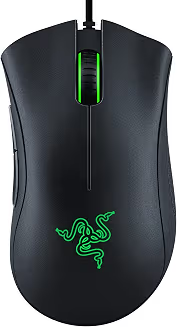
Razer DeathAdder Essential Ergonomic Wired Gaming Mouse, Black
| Brand | Razer |
| Product Dimensions | 5″L x 2.43″W |
| Color | Classic Black |
| Connectivity Technology | Wired |
| Special Feature | Durable, Ergonomic Design, Lightweight, Optical Sensor, Programmable Buttons |
4. HyperX Pulsefire Core (The Underrated Sleeper Pick)
This one doesn’t get talked about nearly enough. HyperX isn’t always the first brand people think of for mice, but the Pulsefire Core quietly does everything right for its price bracket. It uses a PixArt-based optical sensor rated at 6,200 DPI, and despite being an older sensor generation, it performs consistently without jitter or unwanted acceleration.
At around 87 grams, it’s light enough for fast flick movements, and the build feels tighter than you’d expect no rattling, no hollow plastic sound when you tap it. The DPI adjustment uses two separate buttons instead of one cycling button, which honestly is a smarter design choice since you can jump sensitivity up or down instantly instead of scrolling through five presets to find the one you want.
The RGB lighting is a nice bonus, though the overall design leans plain rather than aggressive-gamer-aesthetic. If you care more about performance than looks, that’s not a downside at all.
Best for: Budget shoppers who want strong sensor performance without paying for branding.
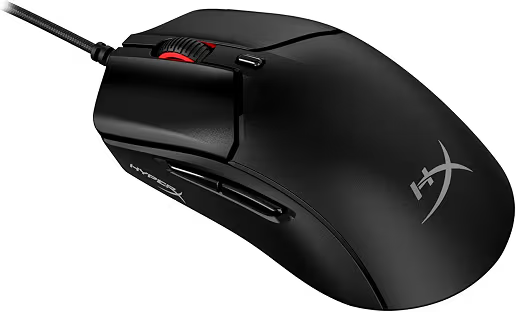
HyperX Pulsefire Haste 2 – Wired Gaming Mouse
| Brand | HyperX |
| Item Weight | 1.83 ounces |
| Color | Black |
| Connectivity Technology | Wired |
| Special Feature | Lightweight, Programmable Buttons |
5. Corsair M55 RGB Pro ( The Ambidextrous All-Rounder )
The M55 sits right around the $30 mark (sometimes just a touch over, sometimes on sale for less), and it’s one of the more comfortable ambidextrous options in this list. At 85 grams, it’s light, and the shape with a soft hump toward the back supports your palm nicely without feeling bulky.
Inside, you get a 12,400 DPI optical sensor paired with Omron switches rated for roughly 50 million clicks, meaning durability isn’t really a concern here. It comes with eight programmable buttons, which is more than most mice offer at this price, giving you room to customize shortcuts for whatever game you’re playing.
My one gripe: the extra side buttons are positioned a little too close to where your thumb naturally rests, so accidental presses happen more often than I’d like. Once you get used to the placement though, it becomes less of an issue.
Best for: Players who want extra programmable buttons and don’t have a strong hand preference.
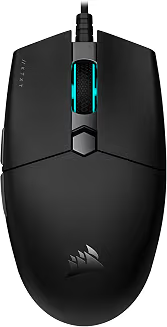
Corsair KATAR PRO XT Wired Ultra
| Brand | Corsair |
| Model Name | CH-930C111-NA |
| Color | Black |
| Connectivity Technology | Wired |
| Special Feature | Lightweight |
6. Corsair Katar Pro XT (The Featherweight Option)
If lightweight is your priority above everything else, the Katar Pro XT deserves a look. At just 73 grams, it’s noticeably lighter than most mice on this list, which makes a real difference during fast flick-shots or quick directional changes in shooters.
It runs a 12,400 DPI PixArt sensor, which honestly feels like it belongs in a pricier mouse. Pairing it with Corsair’s iCUE software lets you enable features like angle snapping, which smooths out recoil control during spray patterns a small detail that makes aiming feel noticeably steadier.
The scroll wheel developed a slight squeak after a couple weeks of use in my testing, though a small drop of contact cleaner solved it completely. Not a dealbreaker, just something to keep in mind.
Best for: Players who value low weight and fast movement above all else.
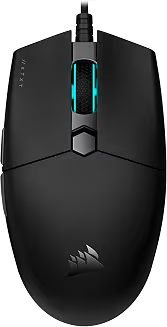
Corsair KATAR PRO XT Wired Ultra
| Brand | Corsair |
| Model Name | CH-930C111-NA |
| Color | Black |
| Connectivity Technology | Wired |
| Special Feature | Lightweight |
7. Redragon M719 Invader Pro Wireless (Best Budget Wireless Pick)
Wireless mice under $30 are genuinely rare, since connection quality tends to suffer at this price. The Redragon M719 is one of the few exceptions worth mentioning. It uses a 10,000 DPI optical sensor and, while it won’t outperform premium wireless mice, it holds up fine for casual and even semi-competitive play.
The shape borrows heavily from more established designs, but Redragon adds its own RGB lighting and a slightly wider base for extra palm support. Clicks feel more responsive than you’d expect from a budget wireless mouse, and the overall build doesn’t feel flimsy despite the low price.
The coating is smooth plastic rather than textured, so if your hands get sweaty during long sessions, grip might suffer slightly. And if you’re playing at a genuinely competitive level, a wired mouse from this list will still serve you better in terms of consistency.
Best for: Anyone who specifically wants to go wireless without spending big.
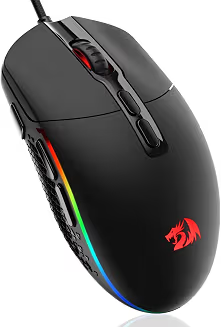
Redragon M719 Invader Wired Optical Gaming Mouse
| Brand | Redragon |
| Item Weight | 5.3 ounces |
| Color | Black |
| Connectivity Technology | USB |
| Special Feature | Ergonomic Design |
Final Thoughts on Picking the Right One
Honestly, there’s no single “best” mouse from this list it depends entirely on how you play. If you want an all-around safe pick, the Logitech G203 or SteelSeries Rival 3 rarely disappoint. If you’re deep into competitive shooters, the DeathAdder Essential or Katar Pro XT will suit your playstyle better. And if going wireless matters more than saving every last dollar, the Redragon M719 is worth the small premium.
At the end of the day, spending under $30 doesn’t mean settling for less anymore. These mice prove that solid sensors, decent build quality, and genuine comfort are all available at a price almost anyone can justify.
What is the best gaming mouse under $30 in 2026?
The Logitech G203 and SteelSeries Rival 3 are the top picks right now. Both offer reliable optical sensors, solid build quality, and comfortable shapes for long gaming sessions.
Can a $30 gaming mouse compete with premium $80–$100 mice?
Yes, for most players. Budget mice today use sensors and switches close to what flagship mice offered a few years ago, with the main gap being extra software features and wireless performance.
Is a wired or wireless mouse better under $30?
Wired is the safer choice at this price. Wireless mice under $30 often struggle with latency and connection drops, while wired options stay consistent for fast-paced games.
How much DPI do I actually need for gaming?
Most gamers never need more than 3,000–4,000 DPI in practice. Mice in this range offer 6,200 to 12,400 DPI, so there’s already more than enough headroom.
Which budget mouse is best for FPS games?
The Razer DeathAdder Essential and Corsair Katar Pro XT are the strongest picks for shooters like Valorant and CS2, thanks to their lightweight builds and precise sensors.